
The fix was ready on Friday. Why did it take another week to reach users?
It's 3:40 on a Friday afternoon. The shipping report that operations runs first thing Monday has been totaling the wrong column since the last release. You've found the cause, written the fix and tested it. Ten minutes, start to finish. The new front-end ACCDE is sitting in your build folder.
It isn't on anyone's PC. The next change window is a week from Tuesday. Until then, the team will work from a report everyone knows is wrong, and someone in operations will spend Monday morning checking the totals with a calculator.
If you maintain an Access application with a front end on every desk, you've lived this Friday. The work is done; its value just hasn't shipped. That week is lost, and nobody wasted it.
This post comes in two parts. The first is how we saw the problem and solved it in April 2016. The second was added in October 2026: what became of that first launcher, and why, in the end, speed wasn't the hardest question.
It's a long post because it was a long road. If you're after one part, jump straight to it:
Everyone in this story is right
So who's holding things up? Nobody, really. For the developer, the job is done. Operations just wants a report that adds up. For IT, the week isn't red tape, it's diligence: every change to two hundred desktops is a risk, and when one of them won't boot on Monday, it's IT's phone that rings.
All three are right. Two cadences just don't line up. A line-of-business app changes weekly, sometimes daily. The path software takes onto managed desktops was built for products that change once or twice a year.
What 2016 has to offer
For multi-user Access apps, Microsoft recommends a back end on a server and a front end that every PC gets its own copy of. So every release has to reach every PC, and the front end depends on things outside the file: registered COM components, ODBC drivers, and a trusted location stored per user and per Office version. Office 2016 shipped in September 2015, plenty of desktops still run Office 2010, and what's set up there doesn't carry over to Access 2016.
MSI and SCCM get a lot right. A package is traceable, shows up in inventory and can be removed cleanly, and admin rights stay with the people accountable for them. Since version 1511 in December 2015, Configuration Manager gets monthly updates. But a package is built to install a product. An app that changes every week turns into a package a week.
Logon scripts and version tables, the workarounds Access developers built for themselves, each solve part of the problem. A logon script only copies at logon, and it fails when the file is open. And the file is always open somewhere: every company has that one person in accounting who hasn't closed the app since Tuesday, because closing it means setting up all their filters again. A version table, for its part, forces the app to replace itself while it's running. That's about as relaxing as swapping out the chair you're sitting on.
ClickOnce, part of .NET Framework 2.0 since 2005, has almost exactly the idea we're after: signed manifests, a per-user install without admin rights, an update check on launch, and the previous version stays cached. But ClickOnce deploys .NET applications, and for changes to system configuration, Microsoft points you to Windows Installer.
We took three lessons from all this. You have to know what runs on a desktop. Updating belongs before the app starts, not inside it. Publishing and installing are separate steps.
Our launcher, between the shortcut and Access
That's how our launcher came about: a small program that sits between the desktop shortcut and Access. To open the app, users run the launcher, not the ACCDE. Access no longer starts itself.
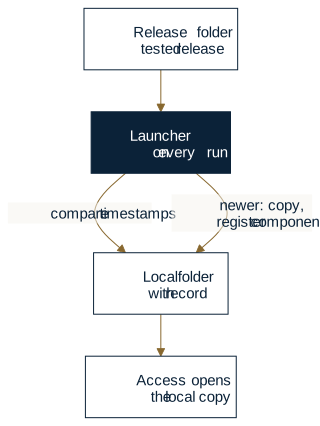
Every time it runs, the launcher reads a configuration file that sits next to it. The file names the release folder, the local folder and the files that make up the app, each with a timestamp and an action: copy only, or register with regsvr32 or regasm. If a file on the share is newer than the local record, the launcher copies and registers it. Then it opens the local copy. Run with /GUI, it opens the screen where the configuration is maintained.
None of this goes around IT. IT decides which folder releases come from and who can write to it, and deploys the launcher once. The publisher puts tested releases in that folder. The launcher automates, within those rules, the steps that repeat on every launch.
For our Friday, that means the fix is in the release folder by 3:50, and operations is running it on Monday. The calculator stays in the drawer.
Four questions we couldn't answer in 2016
The launcher turns a week into a weekend. There are four questions it can't answer.
- Components need admin rights.
regsvr32writes to the machine-wide part of the registry. Any release that brings new components is still a job for IT. - A timestamp isn't proof of origin. The launcher takes whatever is newer on the share. We trust the share because it's on the internal network. That's exactly the assumption John Kindervag challenged with Forrester's Zero Trust model in 2010, and that Google set aside with BeyondCorp in 2014.
- Overwriting isn't a rollback. If the new release is broken, the way back is another manual copy.
- Trusted locations are still manual, set through Group Policy or by hand, once per Office version.
Deployment isn't finished until it can handle a bad release. In April 2016, we're not there yet.
Ten years later
From here on, this is the state of things in October 2026.
The launcher from part one stayed in production with customers until 2025; it was last maintained in 2021 as version 1.1, and parts of it still run at two large enterprises today. Its successor wasn't built by patching it, because the four questions changed the job itself. In 2016, the job was getting a new file to users in time. Today, it's making sure every release is controlled, verifiable and manageable, even when something goes wrong.
That turned into two programs: Bootstrapper, the starter on every PC, and Bootstrapper Manager, where the publisher describes what the starter delivers. Here's how they answer the four questions, plus three more that came up along the way:
| Question | Today's answer | What it gets you |
|---|---|---|
| Who registers components without admin rights? | The starter installs into the user's profile and registers components for that user, matching the installed Office. | Releases don't need admin rights. |
| How does the starter know where a release came from? | With a delivery key, it accepts only releases that carry the publisher's valid signature. | Verifiable origin for every release |
| How do you back out of a bad release? | Every version gets its own folder; the previous one starts from the settings window, or the publisher withdraws the release. | A way back without copying files by hand |
| Who sets up the trusted location? | The starter, on every install. | No manual entry per Office version |
| What if an install stops halfway? | It runs as one transaction: every step is logged and rolled back on failure. | No half-installed PCs |
| What if the share is unreachable? | The installed version starts; the update waits for the next launch. | People keep working. |
| Who maintains the description of a release? | The publisher, in Bootstrapper Manager, checked against the starter's own rules. | Repeatable releases instead of hand-edited config |
No admin rights, and no end run around IT
The starter writes only to the user's folders and to HKEY_CURRENT_USER; it never asks for elevation. ODBC drivers, data sources and a private .NET runtime are installed per user too, with a count of which apps need them. Anything that genuinely needs admin rights stays with IT: system-wide drivers, the Access Runtime, machine-wide registrations. If one of those is missing, the starter reports it with an error code, and every code has a help page with the cause and the fix.
A folder for every version
The starter doesn't overwrite anything anymore. Every version gets its own folder in the user's profile, and the running one is never touched. So the person in accounting can keep the old copy open as long as they like; they'll get the new one on their next launch. For every user, there's a record of which file and which registry value is installed.
If a release is bad, there are two ways back. Whoever needs to keep working starts the previous version from the settings window. And the publisher republishes the previous release and explicitly withdraws the bad one (/publish /withdraw). On the next launch, everyone is back on the previous release.
Describe the release, don't script it
In 2016, a release was described in an XML file, maintained in the launcher's own screen. Today it's a project file, and the publisher edits it in Bootstrapper Manager, an Access application installed with Office SDK. Each page covers one part: which files go where, which shortcuts, registry values, file types and conditions come with them, and what launches at the end.
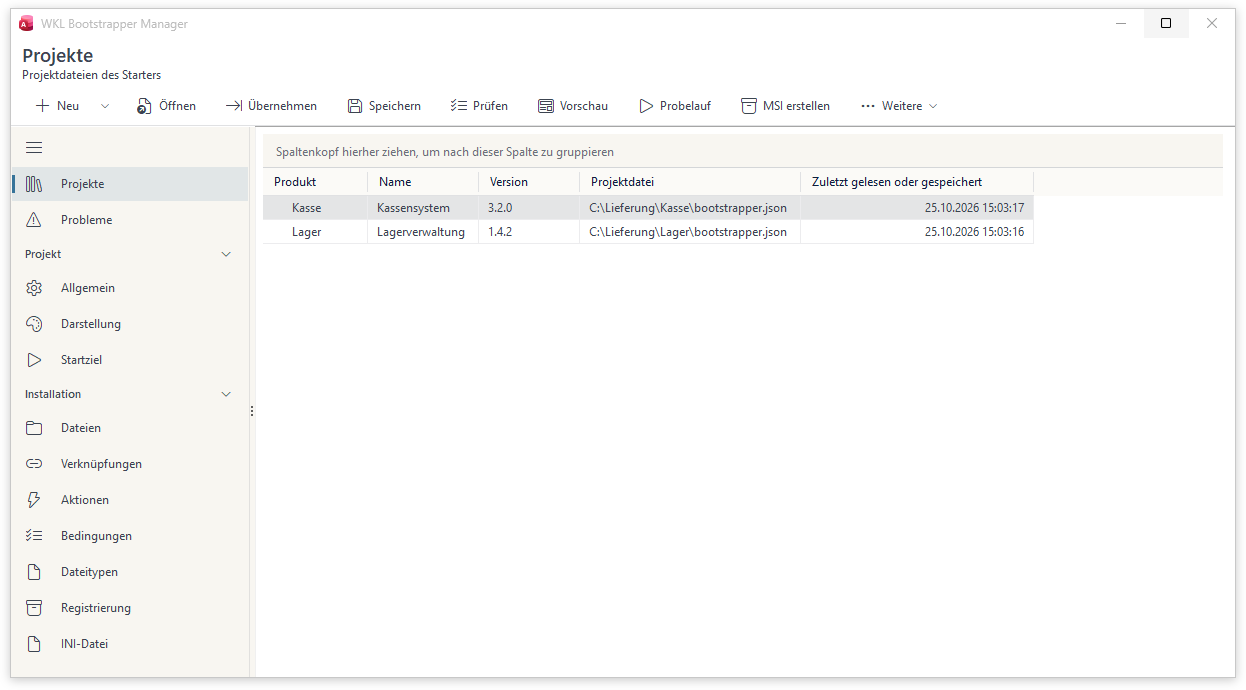
- Check (Prüfen) has the starter itself assess the project file, by the same rules it will apply on the user's PC, and takes you to the field where the problem needs fixing.
- Preview (Vorschau) shows the window users see during setup. Trial run (Probelauf) shows where each file would be installed, without changing anything.
- Build MSI (MSI erstellen) builds the package IT uses to deploy the starter and project file once, through Group Policy, Intune or Configuration Manager. You only need a new package when the starter or the project file changes.
- Import (Übernehmen) turns the configuration of the launcher from part one into a project file. It deliberately leaves out SQL connections and passwords: they don't belong in a file that gets copied to every PC.
That answers the four questions. But a fifth one turned up along the way, and it outweighs the other four combined.
When the tool becomes the risk
Friday, 3:50 p.m.: you drop the fix into the release folder, and by Monday two hundred desktops have it without anyone lifting a finger. That's the whole point of the starter. It's also what makes it interesting to other people: slip it one bad file, and you've reached every desktop in one move, and a mistake spreads exactly as fast as a fix. So how do you keep the tool that makes deployment fast from becoming the weak spot itself?
In October 2026 we ran the starter against MITRE's CWE catalog, the shared list of known classes of software weaknesses. What we say about the old launcher is based on its surviving code from 2021.
What a signature proves, and what it doesn't
The old launcher took whatever was newer on the share. But newer doesn't mean genuine: a colleague drops in an untested file, a sync tool leaves half a copy behind, an attacker with write access swaps a library. Today every release comes with a list of all its files, each with its size and SHA-256 hash, signed with the publisher's delivery key. The starter checks each file before copying it, and again on the copy, before anything opens it. If anything doesn't match, nothing is installed and the current version starts.
A valid signature then tells you two things: these files come from whoever holds the delivery key (authenticity), and they haven't changed since (integrity). It doesn't tell you whether that publisher was allowed to ship the release; IT decides that by choosing which key goes in the project file and who can write to the source folder (authorization). It doesn't tell you whether the report adds up (correctness); that's what testing, the trial run and the way back are for. And it says nothing about how secure the app's own code is; that stays with the app's publisher.
There are two limits. Without a delivery key, the starter only checks that the files match the list, not who wrote them; without a list, it installs whatever was delivered, just like in 2016. Checking the project file flags this but doesn't forbid it, so existing deployments keep running. And any program running under the publisher's account can sign with the key. Use that account for publishing and nothing else.
Two findings in our own release
The review found two weaknesses in our own release 3.2. Version 3.3.0 fixes both.
Libraries from the wrong folder. Once a USB stick became a supported place to launch from, an old Windows habit turned into a risk: programs look for libraries in their own folder first. Up to 3.2, so did the starter. On a stick or a share that other people can write to, a suitably named DLL placed there would have been loaded into the user's process. Version 3.3.0 loads Windows libraries from the system folder only, and the acceptance run for every release places genuine Windows libraries next to the starter and counts whether any of them get loaded.
A folder name that isn't one. Folder names on the user's PC are built from the product key. Up to 3.2, the starter also accepted . and .. there, which would have pointed at its own WKL folder or the profile above it. Since 3.3.0, the product key follows a strict character rule.
Our own review caught both. That's the better order of events.
The other decisions, each with its limit
- Someone puts an old release with a known hole back on the share. It's signed, after all. With a delivery key, the starter has refused since 2.2.4 to install anything lower than the highest version the user has ever had, unless a signed withdrawal names that exact version. Limit: A new user or a new PC will install the older signed release.
regsvr32runs code from the DLL to register it, on every PC. Today registration arrives as data (registration.json) underHKEY_CURRENT_USER, and programs start by a fixed path, with no shell and noPATHsearch. Limit: Actions, such as a driver installer, still come straight from the source folder, and the signature doesn't cover them.- The configuration writes wherever it likes. Today targets live only under the user's folders, and paths in the release list can't lead out of the version folder. Limit: The trust anchor is the starter's folder with its project file; it belongs under Program Files, deployed with the MSI, where users can't write.
- A password sits readable in the configuration; the old launcher only Base64-encoded it. Today INI entries that look like passwords fail the check, the log holds no connection values, and the import leaves passwords out. Limit: Whatever the app itself stores is its publisher's responsibility.
- The trusted location is too broad. Today only the user's own application folder is added; if a policy forbids that, the starter stops instead of working around it. Limit: Then it's IT's call.
- An interrupted install leaves old and new files mixed. Today every install runs as a transaction with a journal; after a power failure, the starter rolls it back on the next launch. Limit: Two starters of the same user installing at the same moment don't coordinate.
- The release is unreachable or can't be verified. Today the last working version starts, and every case has its own code. Limit: The user sees no message; only the log and the diagnostics show it.
A Monday when something goes wrong
It goes something like this, and it happens everywhere. At 3:50 on Friday, version 3.2.1 is signed and published. On Saturday, a colleague drops a corrected report template straight into the source folder without publishing again. Well meant, quickly done, not signed.
Monday, 7:30 a.m.: the file doesn't match the signed list. The starter installs nothing, starts the installed 3.2.0, and logs code 51. Nobody ends up on a mix of two versions, but nobody gets Friday's fix either. The app administrator sees the code in the diagnostics, and the publisher checks the file and publishes again.
Wednesday: 3.2.1 is running everywhere, signed and unmodified, and one rarely used report totals the wrong column. No signature can catch that, because the file is exactly what was released. Anyone affected starts 3.2.0 from the settings window; the publisher puts 3.2.0 back in the source folder and withdraws 3.2.1 with /publish /withdraw 3.2.1. Whether to go back is a person's call. The starter makes sure the way back is safe.
Who decides what today
The 2016 split of responsibilities still holds, and today it's part of the protection: every part can do less. Bootstrapper Manager has no rules of its own; the starter decides whether a project file is valid. The publisher holds the delivery key, but which key counts is set in the project file IT deploys. So a stolen key without write access to the source folder is worth as little as write access without the key; the exception is actions.
| Who | decides or does | and doesn't |
|---|---|---|
| IT | decides the source folder and who can write to it; deploys the starter and project file once as a signed MSI; provides whatever needs admin rights | deploy every release one by one |
| Publisher | describes the release in Bootstrapper Manager, puts it in the source folder, signs it, withdraws a bad one | change IT's rules or deliver anything the project file doesn't list |
| Starter | checks the signature and prerequisites, installs as a transaction, launches the app | decide what's allowed, or accept an unsigned release when a delivery key is set |
| App administrator | starts the previous version when needed, reads diagnostics and the log, repairs a damaged copy | copy files by hand |
| Users | open the app from the same shortcut as before | keep track of versions |
Here's the path a release takes today, from preparation to launch or rollback:
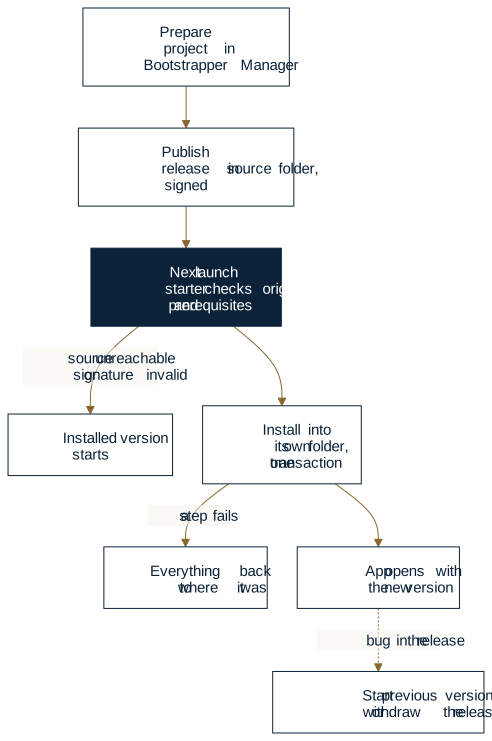
That's why the core of Bootstrapper isn't copying files. The 2016 launcher could already do that. The core is a controlled release lifecycle, where origin, permissions, failures and the way back were part of the architecture from the start.
The same Friday, today
Back to operations and their shipping report, this time with Bootstrapper. Say your Access app has two hundred users, you ship releases several times a month, and IT works in fixed change windows.
Once, before the first release. You create the project in Bootstrapper Manager, enter the source folder, files and launch target, check it, do a trial run and build the MSI. You create your delivery key once and add its public part to the project. IT deploys the package in one of its change windows and decides who can write to the source folder. After that, releases no longer wait for a change window; only a new starter or a new project file does.
Friday, 3:40 p.m. The fix is done. You copy the release to the source folder and sign it with /publish. By 3:50 it's published: no ticket, no new package, no change window.
Monday, 7:30 a.m. When people open the app, they briefly see the starter's window while the new version installs into its own folder. Then the app opens with the correct report, and the calculator stays in the drawer. The person in accounting still has the old copy open and isn't in anyone's way. Anyone working from home without access to the share runs the installed version and gets the release the next time they launch while connected.
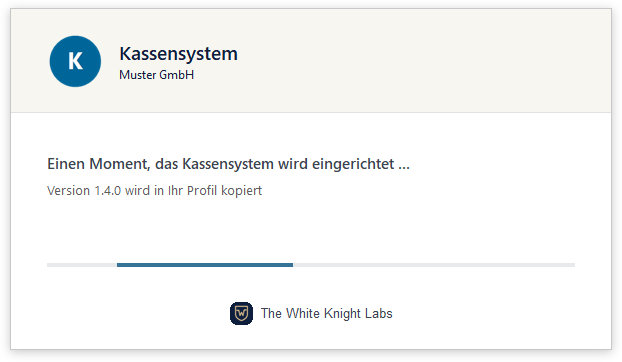
What your users see on the first launch of a new version, before the app opens. Preview from Bootstrapper Manager with German sample data.
Thursday, a call: “The app won't open for me.” Instead of a desk visit, your app administrator walks the user through opening the settings window (/settings). It shows whether the app can start and which versions are installed. The error code leads to a page with the cause and the fix. If something is missing that the starter is allowed to install itself, /repair puts it back. If it's something that needs admin rights, such as a system-wide ODBC driver, the code tells you what IT needs to provide.
Written, published, running on the user's PC: there's no longer a week of manual work between the first state and the last, just the next launch. And IT didn't give up any control to get there. IT still decides which folder releases come from, who can write to it, and which key counts. The starter delivers your app; it doesn't build it. You build it with something like Office SDK. What it expects of your PCs is spelled out in the documentation.
Build it yourself?
The first launcher, sure: it was a small program, the kind any experienced Access developer can write. The hard part is everything that came after: per-user registration in the right bitness, a transaction that rolls back even after a power failure, reference-counted shared components, signatures that block rolled-back releases, error codes with their own help pages, an MSI for IT, and a security review that finds things in your own release, too. That list is what ten years in production turned a small program into, and every item on it has to be maintained.
Does your Access app have a few dozen or a few hundred users, do you ship several times a month, and does every release mean coordinating, copying and checking individual PCs? What would it be worth if IT set up the framework once, and every release you publish after that reached users on their next launch, with verifiable origin and a way back?
If your setup sounds similar, we're happy to look at it with you: whether Bootstrapper fits, what your PCs need in place, and how big a rollout would be.
Bootstrapper: features, requirements, and booking a call · Rather talk first
Further reading: Copying the front end is the easy part covers what breaks on individual PCs the Monday after a release. The story of Office SDK explains where the releases the starter delivers come from.