
Office JSON
A JSON parser for VBA—with the object model you know from MSXML
Load a web service response, query it with JPath, read typed values, and write JSON back—with the object model of MSXML. Amounts and long identifiers come back exactly as they were sent.

The challenge
Web services and REST APIs answer in JSON, and Access and VBA have nothing built in for it. Parse JSON by hand or read it through Double, and you lose a digit fast: amounts get rounded, 19-digit IDs no longer fit, and a date shifts by the time zone.
The solution
Office JSON brings JSON to VBA with the object model of MSXML. Numbers keep the text they were read with—saving never changes a digit.
How you work with it:
- Load the response with
LoadJson;ParseErrortells you where the text is wrong. - Query it with JPath and read typed values such as
GetCurrencyorGetDate. - Change or add nodes, then write the result as JSON text or to a file.
- Nothing new to learn:
JDoc,LoadJsonwithParseError,SelectSingleNode,SelectNodes, andFor Eachwork as in MSXML. - Exact numbers: Currency and Decimal come back without a detour through Double, and 19-digit identifiers survive.
- Queries instead of loops: JPath per RFC 9535 with paths, wildcards, recursive descent, slices, and filters.
- Errors you can handle by number: fixed error numbers with the path or position in the description.
From text to an exact value
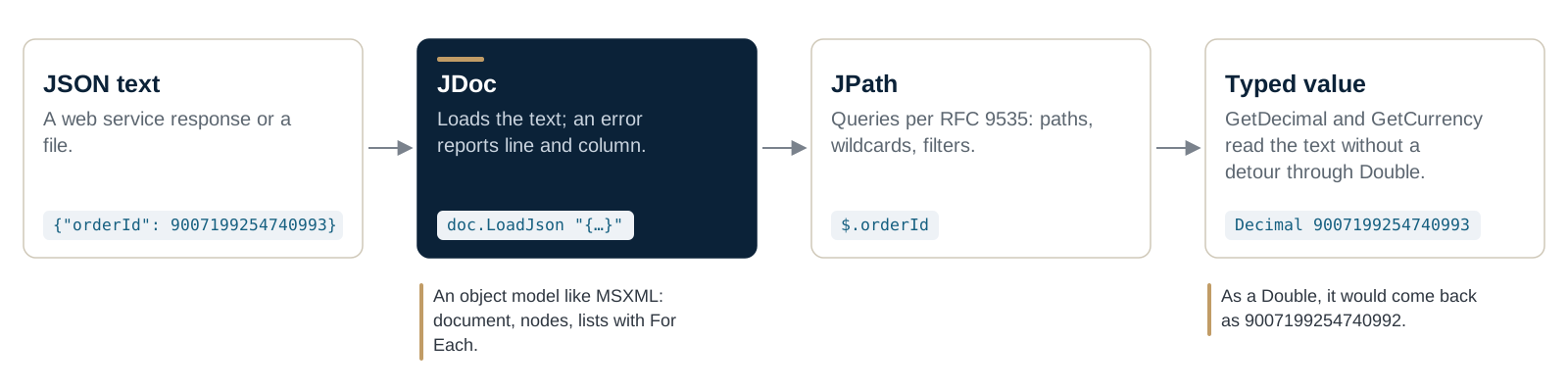
JDoc loads the text, JPath finds the value, and the typed getters read it exactly as it appears in the JSON.
Features
- Typed getters with a default like
Nz():GetString,GetLong,GetCurrency,GetDecimal,GetDate, and more - A value that doesn't fit the requested type is rejected, not truncated
- ISO 8601 dates in both directions, with one time-zone rule per document
- Create JSON:
SetValueadds missing objects and arrays; copy and remove nodes - Error messages in English, German, Slovenian, Croatian, or Italian
- Nothing to install at run time: one native DLL per bitness, no .NET
Technical details
- Requirements: Microsoft Access from Microsoft 365 plus one native DLL matching the bitness of Office—no .NET and no other runtime. Technical details, installation, and deployment
Frequently asked questions
What do I need to install?
Just the library: one native DLL per bitness, with no .NET and no runtime. Install and deploy
How strict is the parser?
It follows the standard, so no value is ever misread. Troubleshooting lists the lenient forms other tools accept that it rejects, and how to handle them.
Where do I start?
With the ten-minute tutorial: load a document, read values with JPath, change it, and save it. Start the tutorial
Is this WKL Access JSON?
Yes. Office JSON is the new name of the library formerly called WKL Access JSON.
Setup, examples and reference, step by step: it's all in the documentation.
Open the documentation