
Your German customer has the data. You already have Excel.
Every new customer seems to bring a new way to exchange data: a portal, an EDI connection, a spreadsheet by email. For a supplier, that often means more manual work on numbers the customer already has. There's another way to set this up. It doesn't need a new application on either side, but it does need your customer to make one decision.
Monday morning, three customers, three channels
Picture a production planner at a plant in Moravia that makes glass vials for pharmaceutical companies. Her three largest customers are in Germany, and each one shares information differently.
The first runs a vendor-managed inventory with her company: it sends a spreadsheet every Monday with its remaining stock of her vials and the expected usage for the coming weeks, and her team decides when to ship. The second has a supplier portal. She logs in, reads the call-offs and confirms them in a form. The third sends delivery schedules by EDI through a web-based service her company signed up for when that customer asked.
By 9 a.m. she has copied numbers from all three into her own planning sheet. Last week's spreadsheet from the first customer turned out to be four days old when it arrived. A batch was rescheduled, and nobody told her until the customer called.
None of this is unusual. For many manufacturers in Central Europe, Germany is the largest export market. In 2022 it took about a third of Czech exports, close to 30 percent of Polish exports, and a quarter of Hungarian ones, according to a 2025 policy brief by FIW, an Austrian research network on international trade. Each of those customer relationships comes with its own way of doing things.
Why your customers choose what they choose
It's tempting to see each channel as a customer's whim. It usually isn't.
Spreadsheets by email are what a customer's logistics team can set up today, without asking IT. They work with every supplier. They're also out of date the moment they're sent, and someone on each side has to handle them by hand.
Supplier portals give the customer control and a defined workflow: you confirm call-offs, upload certificates and answer quality claims in one place. With hundreds of suppliers and processes that need approvals, that is a sound choice. From your side, it means another login per customer, another interface to learn, and with some industry platforms a monthly fee per customer connection.
EDI is the right tool for business documents that move from system to system, like delivery schedules, shipping notices and invoices. It isn't built to answer a question like “how many of our vials do you still have on the shelf?” Getting connected can also be a project of its own for a smaller supplier.
A VPN with a database login is something your customer's IT will rarely offer. A VPN opens a network, not a table. Database logins for outside companies have to be created, maintained and audited one by one. Ask on any database forum, and the standard advice is to keep external parties out of the database server altogether.
A custom API fits a customer's exact business rules. But each new question means new development work, and while Power Query can call a REST API, the JSON it returns usually has to be shaped into a table by hand. OData standardizes structure, metadata and filtering, so Excel can load it as a table directly.
| Channel | What it does well | What it costs you as the supplier |
|---|---|---|
| Spreadsheet by email | works with everyone, no setup | stale numbers, manual copying |
| Supplier portal | guided workflows, approvals, documents | one more login and interface per customer, sometimes a fee |
| EDI | reliable business documents between systems | onboarding, and no answers to ad hoc questions |
| VPN and database login | direct access with familiar tools | rarely offered, for good reasons |
| Custom API | exact business logic | development on both sides for each new question |
Each of these is the right answer somewhere. The trouble starts when a small question, like your own stock at your customer's site, gets one of the big answers.
What's actually missing?
Your customer's database already has the numbers. Your Excel can already read a standard data feed called OData. Power BI can too, and so can Access with a driver. So which part of the connection is actually missing?
Usually, it isn't software on your side. It's a decision on your customer's side, in three parts:
- Who is asking? Each person at your company signs in with a key of their own. The customer issues it, can set an expiry date and can revoke it at any time.
- What may they ask for? One published view of the data, read-only. Nothing else exists for that key.
- Which rows come back? The database filters the view by the person asking. You see your company's rows, and other suppliers see theirs.
A service in front of the customer's database makes the first two decisions. Only that service can reach the database server, and it takes requests over HTTPS. The database itself makes the third. What your planner gets is an address and a key, and her Excel knows what to do with them. That turns a single supplier connection into something bigger: an infrastructure in which data access, the business application and the protection of the connection are no longer inseparable.
This is how Database Gateway, our service for controlled data access, works. It's our own product, so read what follows as our description, and check it against the documentation we link.
What your planner would do
Assume your customer has set this up. Your planner receives two things: an address such as https://data.customer.example/odata/v4/supply/dbo/, and a personal key.
In Excel she selects Data > Get Data > From Other Sources > From OData Feed and enters the address. When Excel asks how to sign in, she picks Basic, types pkuser as the user name and pastes her key as the password. Excel stores the key in its own credential store, not in the workbook.
The navigator shows a single table. It contains her company's rows and nothing else: stock of her items at the customer's site, consumption, open call-offs, whatever the customer chose to publish. If she filters by one item, Excel sends the filter to the service, and the customer's database does the filtering. Refresh gets the numbers as of the customer's last booking.
The customer can also hand out a ready-made workbook to all of its suppliers. The workbook contains the address but no key. Whoever opens and refreshes it signs in with their own key and sees their own company's rows. Power BI Desktop connects the same way. The Excel tutorial and the Power BI tutorial show each step.
Once your customer has the service running, building a basic template like that takes minutes. Setting up the service, its certificate and its rules is work for your customer's IT team. That's the part you can't do for them.
What your customer sets up once
This is the part to forward to your customer's IT team. Seeing that it's small helps the conversation.
In the database they already have a table with the stock of all suppliers. They add a short mapping of which person belongs to which supplier, and one view that shows only the published columns and only the asking person's supplier:
CREATE VIEW supply.SupplierStock AS
SELECT s.Supplier, s.Item, s.Quantity, s.LastWithdrawal
FROM supply.Stock AS s
WHERE EXISTS (SELECT 1 FROM supply.PersonSupplier AS ps
              WHERE ps.Supplier = s.Supplier
                AND ps.Person = CAST(SESSION_CONTEXT(N'wkl.person') AS nvarchar(256)));
That's row-level filtering done by the database, in the view itself. Internal columns, such as purchase prices, simply aren't in the view. In the service they create one rule (this view only, read only) and issue a personal key per person. On every request made with such a key, the service writes the person's name into the database session as a read-only value (SESSION_CONTEXT), and the view reads it from there. The documentation describes this pattern step by step as restricting agents to their customers.
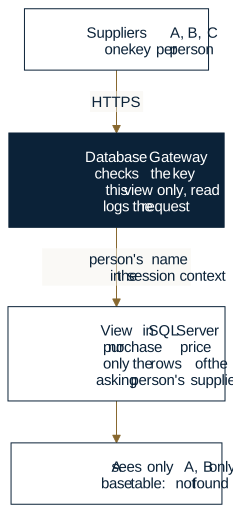
When a fourth supplier with the same kind of data comes along, your customer adds rows to the mapping, people and keys. That's upkeep, not a new project, as long as the new supplier reads the same data. One that needs other fields, other processes or stricter security requirements means a view of its own, or more. And that's why this can work for the customer too: one view serves every supplier that shares the data model.
What we tested
On November 5, 2026, we rebuilt exactly this setup with the current release of the service. We used a separate test instance and test tables, and removed both afterwards.
The setup had one stock table with three suppliers and an internal price column. Two people each were mapped to two of the suppliers, nobody to the third, and one more person had the rule but no supplier at all. There was one view without the price column, one rule for that view only, and one personal key per person. All 20 checks came out as expected:
- Every mapped person read only their own supplier's rows. The person without a supplier got zero rows.
- The base tables and an unrelated table answered “not found.” So did a single row of another supplier, requested directly by its row ID. A filter on another supplier's name returned zero rows.
- Changing and adding rows were refused, and so was a hand-written SQL query against the stock table.
- Four people sent 400 requests between them, up to 16 at a time. Not one answer contained another supplier's row. Afterward, a service key without a person queried the same view 50 times and got zero rows every time. A pooled connection that was reused didn't carry the previous person along.
- Through our ODBC driver, in its 64-bit and its 32-bit build, people also saw only their own rows.
- The access log held 410 entries. Each one names the person, the key, the rule that allowed the access, what was requested and the result.
To be clear about what this is: it's our own test of one scenario, not an independent security assessment or a certification. The 400 requests check that nothing gets mixed up under concurrent load. They aren't a performance benchmark. And we tested reading. The suppliers' attempts to write were refused because the rule was read-only.
Can we send data back?
This is where conversations tend to blur three different things.
Excel and Power BI read. They load through Power Query and refresh. What you type into an Excel cell does not flow back into your customer's database.
Access can write. With our OData ODBC driver, Access links the service's tables and views and edits them in datasheets and forms, if the customer's rule allows it. That's measured, including two people editing the same record. Access then shows its usual write conflict instead of quietly overwriting (writing and write conflicts).
Confirming an order is a process, not just a permission. If your customer wants you to confirm delivery dates this way, they need a target built for that. That could be a table or a stored procedure whose checks ensure you can only confirm your own call-offs, with valid values. That's a design task for your customer, with its own testing. Our test above doesn't cover it, and the service doesn't replace business logic. Where a confirmation is a binding business document, EDI is still the right channel.
What stays the way it is
On your side, less changes than you might expect. The planner keeps working in her own workbook. The only new thing is a query that pulls the customer's latest figures on refresh. Your service technician keeps his Power BI report on spare parts at customer sites, and the customer becomes one more data source in it. The small order management app in Access that has run for years links the published view through the ODBC driver like any other table. It can write only where the customer's rule allows it.
Nobody on your team learns another application, and nobody maintains an account in someone else's system. What you may see and change is still decided by your customer, in one place. That keeps the tools you've invested in useful on both sides of the relationship. If that Access app needs a more reliable way to get new versions to its users, Copying the front end is the easy part covers it.
Who is responsible for what
The boundary is simple, and it helps to say it out loud with your customer.
Your customer decides what to publish, to whom, for how long, and whether you may write. Their service checks every request, logs it, and can revoke a key with effect from the next request. It's a new dependency for them: if the service is down, no one gets the data.
You are responsible for what happens once the data is on your side. The service can't see whether a file gets copied, forwarded or printed after it's loaded. Keys are personal, so each person gets their own and you don't share one across the team. That way the customer's log names the person who actually asked, and one person's key can be revoked without cutting off everyone else.
If someone at your customer is renamed or leaves, the mapping in the example follows the person's name. The service also passes the person's number from its administration (wkl.person_id), which doesn't change on a rename, so new setups are better off mapping by that. Your customer's IT team will find the details in the security model and its trust boundaries.
Why a shared data contract is your best argument
Your customer won't publish a view because it helps you. They'll do it if it costs them less than the alternatives across all their suppliers. So it's worth knowing how that math looks from their side.
What decides it is the twentieth supplier, and one question nobody asks early enough: do they all read the same thing? If they do, the published view is more than a query. It's a data contract, a set of columns with agreed meanings that every supplier can rely on and that your customer designs, tests and maintains once.
Here's an illustration for a customer with 20 suppliers over three years, in person-days. The figures are assumptions for a read-only task. They aren't measurements, and they don't come from customer projects. Plug in your own; the shape of the result is what matters.
| Approach | Fixed | Per supplier |
|---|---|---|
| Custom interface | – | build 8, upkeep 2 a year |
| Portal | rollout 60, operation 15 a year | onboarding 1, user upkeep 0.5 a year |
| Access layer | setup 10, two views at 3 each, operation 6 a year | onboarding 0.5, upkeep 0.25 a year |
Without a shared data contract, every supplier needs a view of its own, which adds 3 person-days per supplier in the model.
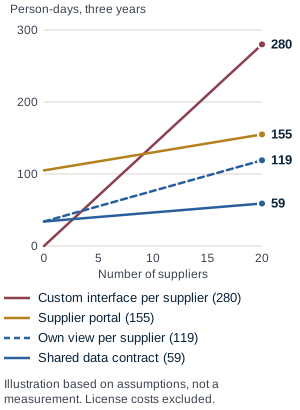
At 20 suppliers, that comes to 280 person-days for custom interfaces, 155 for a portal, 119 for an access layer with a view per supplier and 59 with a shared data contract. The totals matter less than the shape of the lines. Custom interfaces have no fixed cost, so with one or two suppliers they're the cheapest option, up to about three in this example. After that, every new supplier costs as much as the first. A portal has a high fixed cost, but it also does more than reading. And the gap between the two blue lines is what the data contract is worth: it grows with every supplier that reads the same thing. License costs, the suppliers' own effort, coordination and training aren't in any of the lines. Database Gateway isn't licensed per seat, and DATEC pro provides quotes.
A data contract also has to be allowed to change. When it does, a second version goes up next to the first, say SupplierStock_v2, and the old one stays until everyone has moved. No workbook breaks overnight.
That's where you have leverage as a supplier or integrator. OData is an open standard, so the same Power Query steps work against any customer's feed. If two or three of your customers publish the same columns, one workbook template serves all of them. Proposing a column layout is a small ask. It saves your customer design work, and it saves you a mapping per customer.
Other products that do something similar
Putting a data service in front of a database isn't our invention. Five widely used products do something similar, each with its own focus. Details are from each vendor's documentation as of November 5, 2026.
| Product | A better fit than a published view when … |
|---|---|
| CData API Server: REST and OData across many sources, including cloud apps; SQL Server and Oracle in higher editions | your customer wants to publish cloud apps alongside databases |
| DreamFactory: generates REST APIs for 20+ databases, roles with per-user filters, self-hosted only | developers connect their own apps and need many databases behind one REST API |
| Skyvia Connect: cloud service that publishes OData and SQL endpoints, with an agent for on-premises databases | a cloud service is acceptable and nobody wants to run a server |
| Directus: data platform with REST, GraphQL and a ready-made admin interface, self-hosted or cloud | people need to edit data in a ready-made interface, not just read it |
| Data API builder: Microsoft's open-source tool; REST and GraphQL for SQL Server, PostgreSQL, MySQL and Cosmos DB; sign-in with Entra ID or tokens | a development team needs an API for its own apps and will run and secure it themselves |
Database Gateway has a narrower focus, and its strength is a combination shown above: the database itself separates rows per person. Excel and Power BI read through standard OData, with nothing to install on the supplier's side. Access writes through the ODBC driver where a rule allows it, and reports write conflicts instead of silently overwriting. Keys, rules and the log for every supplier are managed in one place.
So the difference isn't that other products can't publish databases. It's how much of the existing infrastructure, business logic and application software has to change to provide access. In the pattern above, the database gains a view and a mapping table, while the business application and the suppliers' Office tools stay as they are.
One access point, many data sources
Integrators know the picture. A customer's stock sits in the SQL Server behind its warehouse system. Maintenance planning runs on a business application built on PostgreSQL, a measurement system writes to MySQL, and twenty years of order history live in an older system on Oracle. A spare-parts supplier would need something from several of them.
Building separate supplier access for each of those databases would just multiply the original problem: four kinds of accounts, four places for permissions, four logs. Controlled data access separates two things instead. Who is asking, what they may do and what gets logged is decided in one place, the same way for every source. How a particular database is reached is handled by a component per system, called a provider in Database Gateway. The prerequisites list which database systems can be connected.
For you, that would mean one key, one place that knows it, and one feed per data source that Excel or Power BI can put side by side.
Suppliers aren't the only ones who benefit. Your customer's developers, or you as their integrator, can build new applications against published views and tables, through OData or the ODBC driver, instead of managing database connections, credentials and permissions all over again in every application.
If you're planning an integration, know that this doesn't replace one. The service doesn't join tables across databases. Combining happens on your side, in Power Query for example, or beforehand in one of the databases. Row-level filtering also stays with each database system: the view in the example reads the person asking from SQL Server's SESSION_CONTEXT, and that's where we tested the pattern.
Three responsibilities, three places
Sooner or later, a German customer's security questionnaire asks about post-quantum cryptography. The European context: the EU's coordinated roadmap asks Member States to take first steps by the end of 2026, and Germany's national guideline recommends a first cryptographic inventory by then and asks organizations to carry crypto requirements into their supply chains. That's how the question reaches you. And for almost every connection between two companies, the algorithms protecting it today will have to be replaced at least once during its lifetime.
First, some perspective. Stock figures from today won't interest anyone in three months. For them, the risk that someone records the traffic now and decrypts it later with a quantum computer is low. Prices, formulations or contract terms that need to stay confidential for ten years are a different matter. So the question depends on the data, not the technology.
How painful that replacement will be is decided long before it happens, by where each responsibility sits. There are three:
- The business application, such as the warehouse system, ERP or maintenance planning, owns the data and the business logic. It doesn't need to know anything about suppliers.
- Data access owns who may read or write which view, and logs every request. That's Database Gateway's job.
- Cryptographic trust owns which company talks to which, on what basis, and with which algorithms. That's the job of TrustBridge.
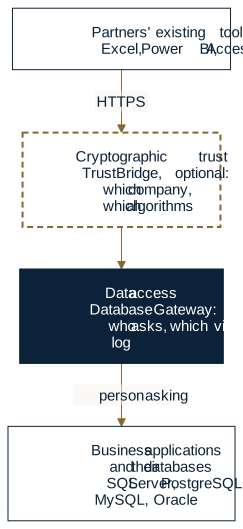
The separation pays off when something changes. When the recommended algorithms change, a separated architecture can contain the change to the communication and trust layer instead of carrying it through every business application. Views, rules and workbooks usually stay as they are. How far that holds depends on the integration: anything an application encrypts or signs on its own has to change with it. When a supplier joins, that's a rule and a relationship, not a change to the cryptography. When a database is added, suppliers don't need new keys or connections; for Excel, Power BI and Access, usually only an address changes. Being able to replace algorithms on a plan and without breaking anything is called crypto agility. It doesn't come from a product. It comes from not hard-wiring algorithms into business applications, VPN accounts or database logins at every single supplier.
TrustBridge is designed for that trust layer, as an addition, not a prerequisite. Data access works over ordinary HTTPS. TrustBridge comes in where two companies want to agree on their trust explicitly: each keeps its own certificates, and both agree on a limited relationship that either side can revoke. Technically, the design calls for TLS 1.3 with hybrid key agreement, classical plus ML-KEM (FIPS 203), an additional, independently generated post-quantum secret, and certificates with an additional ML-DSA signature (FIPS 204). Algorithms and parameters follow Germany's BSI TR-02102-1. A hybrid scheme only protects, though, where both sides require it. The documentation on connecting to Database Gateway shows how the two fit together.
When such changes are due is set by recommendations, obligations and contracts, and the three are easy to mix up:
- Recommendations. The EU roadmap recommends migrating high-risk use cases by the end of 2030 and medium-risk ones by the end of 2035. BSI TR-02102-1 (version 2026-01) recommends classical key agreement on its own only until the end of 2031, so from 2032 only as a hybrid. Classical signatures on their own are expected to stay recommended until the end of 2035. In the US, NIST's transition plan (IR 8547) deprecates quantum-vulnerable public-key algorithms after 2030 and disallows them after 2035. We haven't found a law that gives companies in general a post-quantum deadline.
- Obligations. Under NIS2 as implemented in Germany (§ 30 BSIG), covered entities must follow the state of the art, explicitly including how they use cryptography, but the law sets no post-quantum date. A hard date exists for products approved for German classified information: the end of 2030.
- Contracts. In practice, the date usually arrives through contracts and questionnaires.
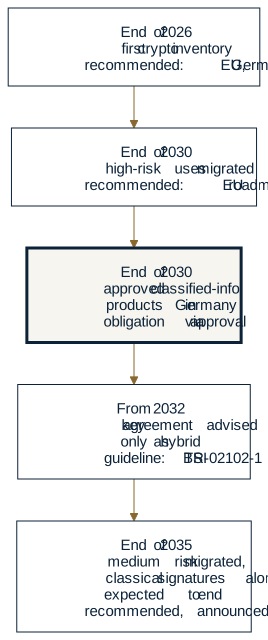
Our reference page on BSI TR-02102 lists every date with its source and status.
A few things make sense now, without waiting for any date. Put your connections to customers on your own crypto inventory, noting who controls each one. Sort the data you exchange by how long it has to stay confidential. And when a questionnaire asks, answer with what you can show today and what is planned, with dates, rather than a plain yes.
Questions you'll hear, and fair answers
“We can't install anything on our customer's side.” Right, and you don't need to. What you bring is a question, plus the fact that your tools can already read the answer. The setup is theirs.
“Is this just another portal?” No. There's no new screen to learn. You work in Excel, Power BI or Access, the programs you already use. If your customer needs a guided workflow with approvals, though, a portal is still the better fit for that part.
“Our customer insists on EDI.” For documents, they should. Delivery schedules and invoices belong there. A published view answers the questions EDI wasn't built for, like current stock at the customer's site. The two can sit side by side.
“Couldn't our customer just build an API?” They could. Microsoft's open-source Data API builder, for example, publishes tables as REST and GraphQL endpoints and can filter rows through the session context. Then your customer runs, secures and maintains it themselves, and you still need a way to get the results into Excel.
“Our customer's data isn't in SQL Server.” The pattern doesn't depend on one database. Each database system is connected through its own provider and filters rows in its own way. The prerequisites list which systems can be connected.
When it fits, and when it doesn't
Three questions sort out which channel fits which job:
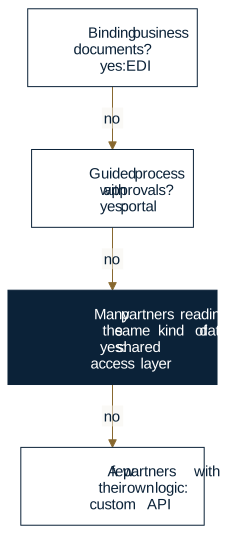
It fits when
- what you need is mostly to read current figures, such as stock, consumption, call-offs, dates or status,
- your customer's other suppliers need the same kind of data,
- your people work in Excel, Power BI or Access,
- and your customer is willing to define a view and run a service in front of its databases.
It doesn't fit, or isn't enough on its own, when
- you exchange binding business documents. That's EDI's job.
- the work needs guided steps with approvals and attachments. That's what portals are for.
- your customer's data isn't in a database at all, only in files or cloud apps, for example. One of the products above is a better fit for that.
- the data may not leave the customer's site at all, not even as a copy on your side.
A conversation on both sides
Back to the planner in Moravia, on a Monday after her first customer has published such a view. She no longer copies a spreadsheet that may be four days old into her planning sheet. She refreshes it and sees the customer's figures as of their last posting. And her customer's IT doesn't manage a login for her company on its production server.
She can't change how all her customers run their systems, and she shouldn't have to. But she can ask one of them a better question than “can we have a login?” Here's one: could you publish the numbers we ask you for every week as a view, so that our Excel reads them directly and your IT keeps control?
If your German customer wants to exchange data without another custom integration, start with a conversation about what already exists on both sides. Sönke Dobat at DATEC pro in Hamburg handles consulting, quotes and support for Database Gateway in Germany. Bring the questions your planner asks that customer every week. Together you'll see whether a published view would cover them, or whether another approach fits better. For security and regulatory questions, he can bring in Prof. Dr. Linus Schleupner, who leads a research project on post-quantum encryption in automated systems at DATEC pro, funded by the European Union and the German state of North Rhine-Westphalia.
- Email: sd@datecpro.de
- Phone: +49 40 77127-123
- DATEC pro GmbH, Nartenstrasse 19, 21079 Hamburg, Germany
To check the details first, the documentation covers background, use cases and alternatives and the prerequisites. How the service came about is told in Remote work was urgent. Building a secure data gateway took years.