
Remote work was urgent. Building a secure data gateway took years.
A look back at how Database Gateway began in the first weeks of the pandemic in 2020. The post covers the later stages of development and describes the product as of October 29, 2026.
In the spring of 2020 the question was simple: how can people work from home tomorrow? Today it's a different one: how do you keep access to business data secure, traceable, fast enough, and maintainable five years from now? In between is the story of a stopgap that worked. That is exactly what made it so hard to replace.
March 2020: the office moved home, the data architecture didn't
A Monday morning in March 2020, one that played out at countless companies. Take the operations planner at a barge company: she’s at her kitchen table, laptop on the VPN. At the office, the voyage schedule in the company's Access app opened in three seconds. Now she watches the spinner. The combo box with the terminals takes half a minute to drop down. On the second form the connection drops. Anyone who has asked about this online knows the replies: “Access was never designed for a WAN.” “Just use RDP.”
At the same time, IT is counting VPN licenses that can't be doubled overnight, and a database server that was never meant to be reachable from the internet. Management has one sentence: the boats have to keep moving. The developer who built the app gets a call: can you fix this by tomorrow?
They were far from alone. A survey by Brynjolfsson and colleagues found that by early May 2020, about half of the Americans who had been employed before the pandemic were working from home, including more than a third who had only just stopped commuting. In Germany, federal and state governments had agreed on March 22 to cut contacts outside the household to the bare minimum. Business applications everywhere were suddenly running in a setting they had never been built for.
The first suspect is always the home internet connection. That misses the point. As Stuart Cheshire put it back in 1996, making more bandwidth is easy, but once you have bad latency, you're stuck with it. An app that asks the database hundreds of small questions to fill one form, and waits for each answer, doesn't get faster with a fatter pipe. On the office network each round trip takes well under a millisecond; over a VPN and a home line it takes many times that. A design that was fine on a LAN became terrible over latency.
Access wasn't the problem. Its way of working met a different network
Blaming Access is the easy answer, and it lands in the wrong place. What matters is how an application reaches its data. There are four setups, and they behave very differently.
The back-end file on a network share. With an ACCDB back end on a server, every workstation reads the file itself, page by page. Microsoft explicitly advises against running a split Access database over a WAN: performance can be slow, and databases may become corrupt. The fear of corruption you see in every forum thread is well founded.
Access front end, SQL Server back end. With linked tables over ODBC, the server does the work. It's the standard move, and it's what most answers recommend: upsize to SQL Server Express and keep the front end. The catch, as one experienced answer on Microsoft Q&A put it, is that SQL Server “can” work over a VPN, but only with further investment in the Access app. Microsoft's own guidance explains why: every list box, combo box, subform, and total on a form is its own query. Whatever the server can't evaluate, Access evaluates locally, and a join between a local and a remote table can send one query per local row. Nobody notices on the LAN. Over a VPN, every wait adds up. And every workstation still has to reach the database server, with the connection and its credentials stored in the Access file.
Access on Remote Desktop. Remote Desktop Services and RemoteApp are Microsoft's supported way to use Access remotely, and the forum consensus that “remote desktop beats the heck out of VPN” is right. Only screen images cross the wire; Access and the database sit side by side in the server room. For many companies it was the right answer in 2020. It does need servers, licenses, user profiles, and a separate front end per user on the host, and all of that has to exist first.
A data proxy over HTTP. The app stops talking to the database and talks to a service that queries the database on its behalf. A few larger requests replace many small ones, and the database server stays out of the workstations' reach.
All four are legitimate. They just distribute latency, responsibility, and attack surface differently. In our situation in the spring of 2020 – line-of-business apps, some in Access and some .NET Windows apps that had grown out of Access, and almost no time – we chose the fourth.
We needed it by tomorrow, not in six months
We built it in days. On the server side: a web service that accepts a SQL statement over HTTP, runs it against the database, and returns the result as tables. On the application side: a small .NET library that looked exactly like the data access the app already used.
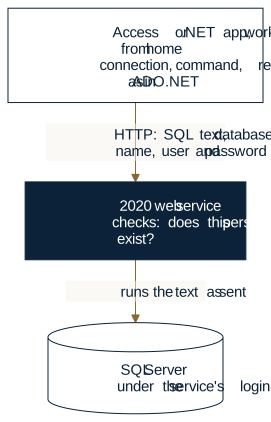
Time pressure made the calls, and we made them deliberately:
- The app sent its SQL statements exactly as it had sent them to the database before. No form had to be rewritten.
- The app named the database it wanted. The service mapped the name to a stored connection.
- Every request carried a user name and password. The service checked that the person existed.
- Database errors came back as message text, so users could see what went wrong.
We tested what users needed the next morning: open forms, change data, print reports. Then it went live. And it worked. The voyage schedule opened in seconds again, the barges kept moving, and nobody had to drive to the office.
A familiar data model over a new path
Why could it be done in days? Because we didn't rewrite the app, only its path to the database. The library mirrored the four roles every .NET developer knows from ADO.NET: a connection, a command with parameters, a reader for the result, and an adapter that fills tables. The application code stayed as it was. All we swapped was what stood behind the word Connection.
That was the real idea, and it still holds: an application shouldn't need a rewrite just because the transport changed. Today's Database Gateway follows it with an ODBC driver, so Access links tables the way it always has.
A familiar model hides things, too. A client library doesn't show what the server does. Three things in the code from back then are worth a look, precisely because they aren't bugs in the usual sense:
- Parameters protect values, not statements. The library passed values as parameters, and the service bound them properly. That keeps a value from turning into SQL. It doesn't help at all when the caller writes the statement.
- A transaction that silently isn't one. Beginning a transaction threw an error. But assigning a transaction to a command was accepted and ignored. Anyone who relied on it got individual statements.
- No limits. Each result was loaded into memory in full, there was no timeout, and a request couldn't be canceled.
Under time pressure, each of these calls made sense. Together they describe a system that works as long as everyone behaves the way you expect.
It worked. Why wasn't that enough?
A solution can do its job completely and still be architecturally immature. That's not a contradiction: “it works” is only one of the properties a system needs.
| Property | Question | The stopgap |
|---|---|---|
| Function | Can people do their work? | yes |
| Performance | Does it stay fast with more data and more users? | untested; every result came back in full |
| Security | Can anyone do more than they should? | yes: anyone who could sign in could send any statement |
| Availability | What happens when the service is down? | nothing works – a new dependency |
| Recoverability | Can you reconstruct what happened? | no record of who read what |
| Maintainability | Can someone else change it? | only carefully, without tests |
| Demonstrable quality | Can you show what it prevents? | no |
The row that matters most is the third. The service checked who was asking, but not what that person was allowed to do. Authentication is not authorization. Anyone with a valid name and the right password could send any statement the service's login could run, against any configured database whose name they knew. As long as only our own app talked to the service, nobody noticed: it only asked the questions it was built to ask. The boundary lived in the client's good behavior, not in the service.
One more thing was missing: proof. Without automated tests, nobody can claim a weakness is fixed. All you can say is that nobody has hit it yet.
The hardest upgrade wasn't technical
Picture the conversation a year later. The developer explains that the stopgap should be rebuilt, with per-object rights, logging, limits, and tests. The client sees an app that has run for a year without an outage or an incident. They paid for it. Now they're asked to pay again for something that, from where they sit, already works. As one developer wrote years earlier, it's hard to convince clients to spend real money rebuilding something that, at least in their eyes, works perfectly fine.
The client isn't being unreasonable. They see a solution that works and a new invoice. The developer sees the same solution and a list of risks no user can see. Both are right, and neither can prove their view to the other. The client can't inspect the inner quality of what they paid for. The developer knows the flaws and is also the one selling the fix, which makes them look suspect precisely when they're right. So the rebuild is hard to justify for the very reason that the stopgap never failed. Nothing happened, after all.
A stopgap built in a crisis is technical debt at a steep rate. Every app that comes to depend on it adds to the balance, and the longer it runs without trouble, the harder it is to pay off. Which leads to an uncomfortable lesson: the success of a crisis solution can become the biggest obstacle to improving it. Nothing is as permanent as a temporary fix.
In the end it wasn't the technology that made the case. It was a question about accountability: who can show today who read or changed what through this link? And who has to explain it when a password ends up in the wrong hands?
The first attempt to close the gap was a design study in January 2025. It asked the right new question: not “which statement?” but “which object?” – a table, a view, a procedure, addressed through the request URL. But it still let the client name the server and the database. And it showed that you can't bolt security on while the core assumption stays that the client decides. We didn't finish it. Today's Database Gateway is a new codebase, started in August 2026.
When the data proxy becomes a security boundary
The decisive change isn't a new protocol. It's moving the decisions. In 2020 the client decided which database, which statement, which data. Today the client asks and the service decides.
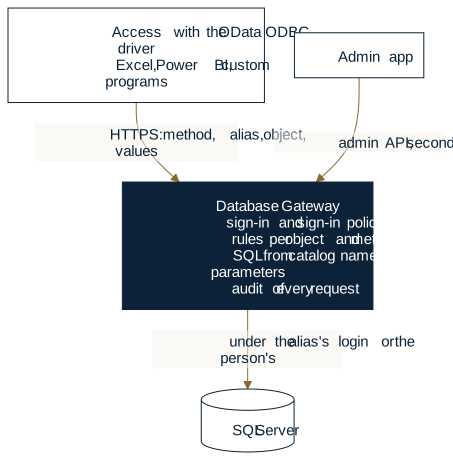
| Who decides … | 2020 | today |
|---|---|---|
| which database? | the client names it | the client names an alias such as fachdaten; only the service knows the connection |
| which objects exist? | any name in the statement | the catalog the service reads from the database; what isn't in it doesn't exist for the caller |
| what someone may do? | nobody – signing in was enough | rules per alias, object type, object, and method, including read-only |
| what the SQL looks like? | the client | the service, from looked-up names and bound values |
| who the database runs as? | always the service account | the alias's login or, if you want, the person |
| what gets recorded? | nothing | every request, refused ones too, with a correlation ID |
Four trust boundaries are now spelled out: between client and service (sign-in on every request, sign-in policy, second factor), between a reverse proxy and the service (origin headers count only from listed proxies), between the service and the database (which login the SQL runs under), and between the service and its admin store (secrets sealed, the master key kept separately).
Sending your own SQL is still possible, because Access needs it for pass-through queries. But it's no longer the silent default. The security model names exactly three ways caller text can reach the database. Unchecked, only with the separately granted sql right, meant for trusted programs. Checked: the service parses the statement, accepts only a closed list of forms, and checks every object against the catalog and the caller's rules. Or unchecked under the caller's own database login, if the data source explicitly allows it; then SQL Server itself sets the limit. Where these paths leave residual risk, the same documentation says so.
Risks users never see
What happens when a data proxy trusts the client? For users, at first, nothing. They see their forms. The risks sit one layer down: in questions the client answered in 2020 and the service answers today.
Who decides which SQL runs?
Whoever writes the statement decides what gets read and changed.1) Bound parameters only protect the values inside it. Today the service builds the SQL for ordinary requests itself, and caller-supplied statements run only on the three paths above. Automated tests back this, along with a measurement on a running service in which every check of checked statements came out as expected. The limit: a caller with the sql right reaches everything the data source's login can reach, so that login has to be scoped tightly. That's the operator's job.
Signed in doesn’t mean authorized
This was the 2020 gap.2) Today a rule applies per data source, object type, object, and method. An object a caller may not read responds like one that doesn't exist, so the caller doesn't even learn that it's there.
Who picks the database?
In 2020, if you knew a database's name, you could reach it; if you named none, you landed in a default.3) Today only aliases are visible from outside. Connection strings are sealed in the admin store, and the admin API never returns them.
How well are credentials protected in transit and at rest?
A password that travels with every request is only as safe as the connection.4) Today the service requires a protected connection for administration, the second factor, and SQL logins. Personal keys are stored only as a hash, and after installation plain HTTP listens only on the server itself. It was also measured that keys appear in clear text neither in the log nor in the store. The limit: open HTTP beyond the server and keys travel unencrypted. The documentation says so plainly.
What does an error message give away?
In 2020, database messages reached users verbatim.5) The 2025 design study would even have sent back the stack trace. Today SQL Server messages go out without hidden names and values, together with a correlation ID the operator can use to find the whole story in the log.
How much can a single request demand of the server?
A result with no ceiling, a request with no timeout, any number of requests per minute – that holds until someone opens a big table.6) Today the service returns results in windows up to a ceiling per data source and limits requests per caller and failed sign-ins per login. The limit: these counters live in memory and start over after a restart.
What a caller gets back without signing in
This is the actual response of a local installation on October 29, 2026 (the message is in the server's language, German here):
GET /api/v1/cf/fachdaten/dbo/Kunden HTTP/1.1

HTTP/1.1 401 Unauthorized
Content-Type: application/json; charset=utf-8
WWW-Authenticate: Negotiate
WWW-Authenticate: Basic realm="Wkl.Data.Gateway", charset="UTF-8"
X-Request-Id: 0HNPH0GANKPIA:00000001

{"error":{"code":"UNAUTHENTICATED","message":"Es wurde weder ein gueltiger Dienstschluessel noch eine Windows-Anmeldung vorgelegt.","correlationId":"0HNPH0GANKPIA:00000001"}}
No rows, no hint whether the table exists, no server version – but an ID under which the refusal sits in the log. The 2020 endpoint doesn't exist on this service anymore.
How solid is this?
Everything above is implemented. More than 1,100 cases in the service are covered by automated tests that run on every build. Sign-in, rights, passing the person through, write conflicts, transactions, and checked statements, among others, have been measured on a running service. Not yet tested: Kerberos in a domain, forwarding through IIS, sustained load, and multiple instances. An independent security review hasn't happened yet. The data service is published as a preview and has no released version.
Performance: moving SQL behind HTTP isn't enough
A data proxy doesn't remove network latency. It can only make you pay it less often. Load an entire table and filter it on the client, and you're just as slow over HTTP as over the VPN, only differently.
So Database Gateway works by three rules, documented in its reference:
- Filter in the service, not the client. Selection, filtering, sorting, and paging belong in the request. Excel and Power BI send their filters to the service through Power Query, and the database does the work.
- Windows, not whole sets. Each request returns at most one window up to the service's ceiling, plus a link to the next one.
- No silent retries. A timeout doesn't mean nothing was written; the client just stopped waiting. Whether to retry is the application's decision. Writes can carry a replay guard, and the service detects write conflicts through a row version: if someone else changed the row, it writes nothing.
The biggest performance gain, though, is visibility. The load log groups requests, stripped of their values, into shapes. A hundred queries from one form that differ only by customer number are one shape. For expensive shapes it names the usual cause: a linked table opened in full, a filter on a column without an index, a program paging deep into a large set. What was a feeling in 2020 – “it's slow again today” – becomes a list you can work through.
How much faster a given form gets can't be put in numbers yet; load and endurance testing is still ahead. What has been measured is that results through the service match the same queries run directly in SQL Server.
Database Gateway today: an architecture that's no longer improvised
Database Gateway is one service and four ways to use it:
| Component | What it's for |
|---|---|
Data service Wkl.Data.Gateway | the only path to the database: sign-in, rights, SQL, logging; a Windows service, also behind IIS |
| OData ODBC driver | Access links tables, reads, edits, and passes queries through; 32- and 64-bit |
| .NET client | typed access from your own programs |
| VBA class | admin commands from an Access app, such as issuing keys |
| Admin app | data sources, rules, people, keys, sign-in policy, and logs |
Excel and Power BI need nothing extra. They read the OData feed through Power Query.
You manage the service with an Access app. Here's what it looks like day to day: the Operations and Access areas on the left, work lists such as “Ohne zweiten Faktor” (no second factor) or “Schlüssel laufen ab” (keys expiring) in the middle, the selected person on the right.
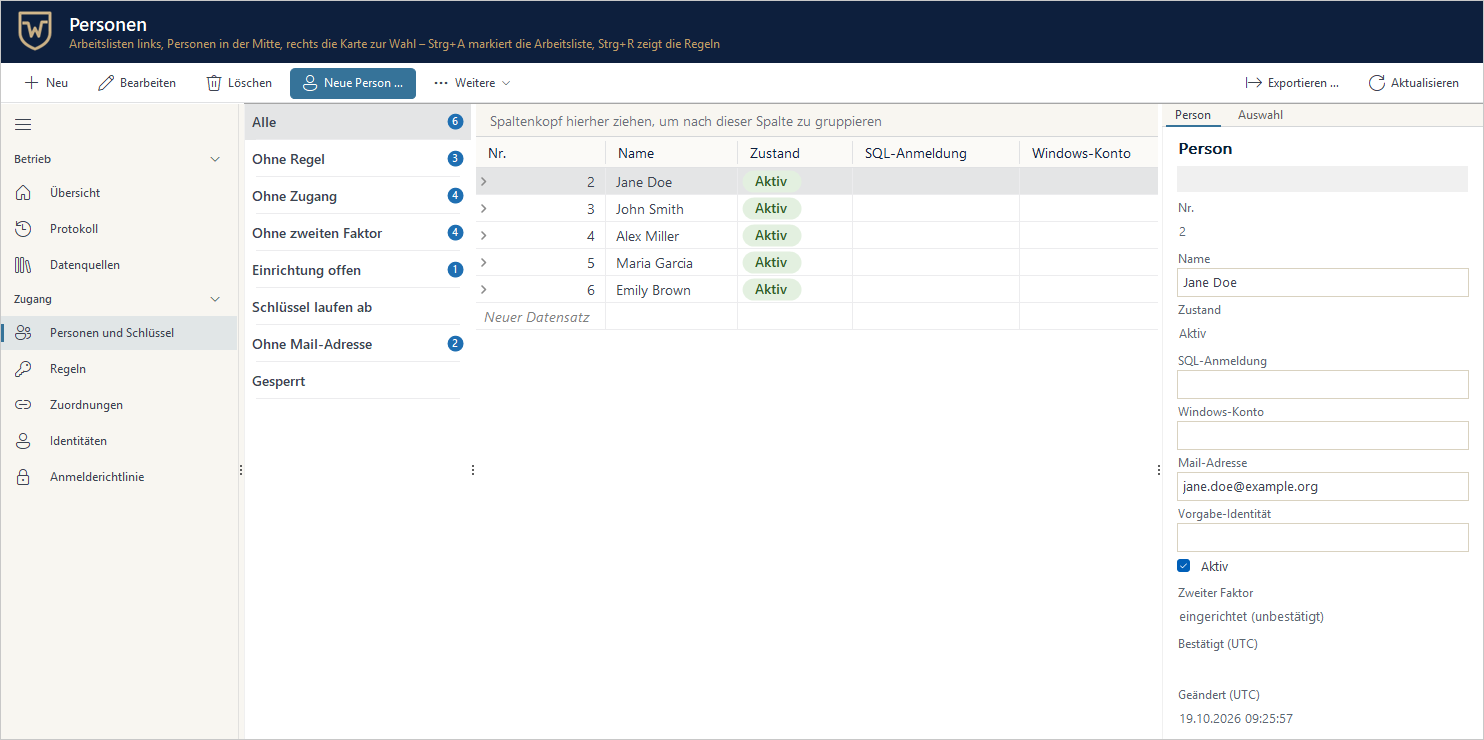
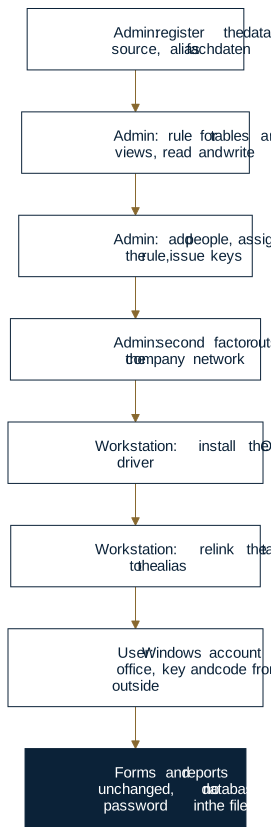
Data sources. You register a database once in the admin app, and from outside it only appears under its alias. The connection string is sealed with a master key that's stored separately from the store. Changes take effect without a restart.
People and rights. A rule names data sources, object types, methods, and whether it's read-only. Rules are granted to people, Windows groups, SQL logins, and service keys. If you want, the database works under the person's own login, so triggers and column defaults see who acted.
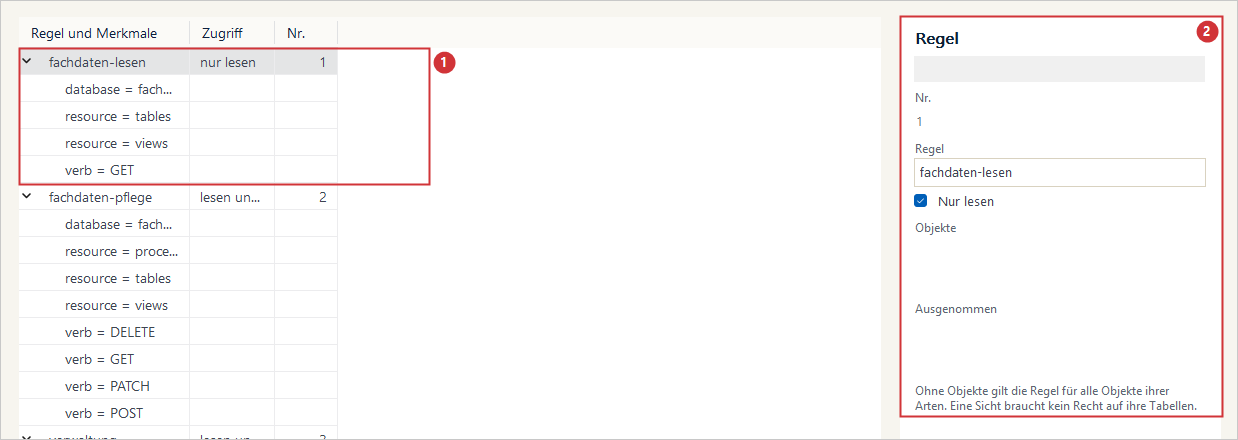
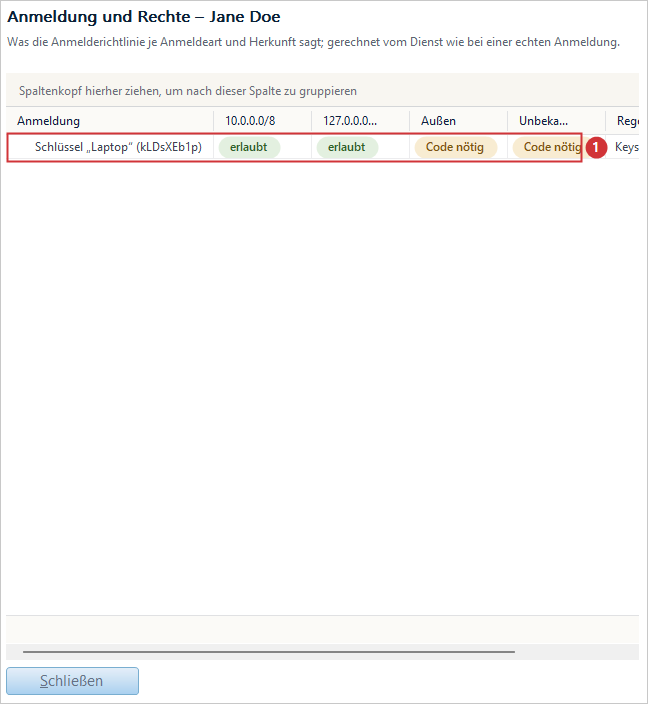
Sign-in by situation. A Windows account, a SQL Server login, a personal key per device, or a service key for programs. The sign-in policy decides by method, network, and country whether the sign-in is enough, a second factor is required, or the request is refused. On the office network the key is enough; from outside, a code from an authenticator app is added.
Audit trail and diagnostics. Every request for data or administration is logged with caller, alias, object, method, result, and correlation ID, including refused ones. Every admin change is in the change log. The sign-in log shows origins and unusual patterns, the load log shows the expensive requests. Logs contain no keys, passwords, connection strings, or values.
Installation. A setup program configures the Windows service, the HTTPS certificate (Let's Encrypt included), and the firewall. The service ships with its own runtime and runs on Windows 10 and 11 and Windows Server 2016 or later. The database is SQL Server 2016 or later. On the workstation, Access 2010 or later needs the ODBC driver matching Office's bitness.
Limits, as the documentation itself states them: only the SQL Server provider ships with it. An admin store belongs to exactly one instance; there's no failover across two instances. If the service goes down, no workstation can reach the data – a new dependency that direct access didn't have. And the ODBC driver doesn't offer every capability of SQL Server's own ODBC driver.
What changes for a company? Say a barge operator keeps its voyages, cargo, and crew records in SQL Server and edits them with an Access app. After the switch, workstations can no longer reach the database server. There's no database password in any Access file. The planner works with her key at the office and with her key plus a code from home. An outside surveyor gets a read-only key for two weeks that expires on its own. A lost laptop's key is revoked, effective with the next request. And when management asks who changed the cargo records in March, there's an answer. The app's forms and reports stay as they are; only the connections of its tables change.
Why buy a gateway instead of writing your own?
An experienced team can write a web service that forwards SQL over HTTP in a few days. We did it ourselves in 2020. Building your own isn't a bad idea. The question is what comes after the first few days.
There are good tools for that, too. Microsoft's Data API builder is open source (MIT), generates REST and GraphQL APIs over SQL Server and other databases, and controls access with role-based permissions per entity and action plus database policies for rows. DreamFactory generates self-hosted REST APIs from more than twenty databases with role-based access per endpoint and scoped API keys. CData API Server publishes REST and OData APIs from SQL Server and other sources, with role-based access control. If your consumers are web apps and scripts, these are mature options. What none of their product pages describes is an Access front end that keeps editing its linked tables in datasheets and forms. That's the gap Database Gateway was built for, with its own ODBC driver and the person passed through to SQL Server.
| Build your own | Finished product | |
|---|---|---|
| First version | fast, tailored to your app | setup, onboarding, switching connections |
| Rights and sign-in | every rule, factor, and lock is yours to build | there, ready to configure |
| Hardening and vulnerabilities | your job, your expertise | the vendor's job, with a way to report vulnerabilities |
| Tests | yours to write and maintain | run on every vendor build |
| Documentation | usually in the developers' heads | public, task by task |
| Updates | when someone has time | as versions with a changelog |
| Incidents | who still knows the code? | a reporting route to the vendor; correlation IDs and logs to trace it |
| Lifespan | tied to people | tied to a product |
Building your own makes sense for a single app on your own network, a handful of tables, a team with security experience, and time to maintain it. A product pays off when several apps, Excel, and your own programs need the same data, when access from outside comes into play, and when someone has to show customers, auditors, or their own management who may do what and who did what.
Buying a data proxy doesn't just buy an API. It also buys the work that comes after day one: reviews, tests, maintenance. Database Gateway has a manufacturer and a documented way to report vulnerabilities and get them fixed, and each released version is meant to receive security updates for five years. The data service is still a preview, though, with no released version yet. Anything beyond that – response times, support, term – belongs in a contract, not in a blog post. Someone has to do that work either way. The only question is who.
From pandemic stopgap to controlled infrastructure
In March 2020 the question was: how can the planner work from home tomorrow? The answer was a stopgap, and it did its job. Today's question is different: how do you keep access to business data secure, traceable, fast enough, and maintainable when the exception of 2020 has long since become everyday work? Database Gateway is our answer: the service decides what's reachable, the person arrives in the database as themselves, and every request leaves a trace.
It isn't the right answer for everyone. If you run one app on your own network and your RDS farm is under control, you may not need it. But if you're still running a link from 2020 – built in-house, bought, or inherited – ask yourself: would you rather own a data proxy for the next ten years – its security limits, its regression tests, its admin, and its upgrades – or use one that already shows its evidence?
Do your Access apps still connect straight to the production SQL Server, and are you planning for outside contractors or remote users? Then the sensible first step is a review of today's data paths: who reaches which database, with which login, from where. From there you can tell whether Database Gateway fits and how big a rollout would be. The review doesn't commit you to Database Gateway.
Next steps:
- Try it: from an empty server to the first query, step by step.
- See an example: Your German customer has the data. You already have Excel. shows how suppliers read only their own rows through a published view.
- Talk it through: a review of your current data paths, a technical demo, or a pilot with one application. Schedule a conversation.
- Get it reviewed: if you're keeping your own data link, you can have it checked in a security audit. If you'd rather renew the application itself, see legacy modernization.
The data service, driver, and client carry no per-workstation license. What a deployment would cover for you – setup, adaptation, support – is something we work out in a conversation, not from a price list.